How to Activate eSIM on Samsung Galaxy Smartphone?

How Do I Activate My eSIM on Samsung Galaxy Smartphone?

Activating your eSIM on your Samsung Galaxy Smartphone is quick and easy when you follow these steps using the QR code provided in your eSIMlii activation email. Here's how to get started:
 
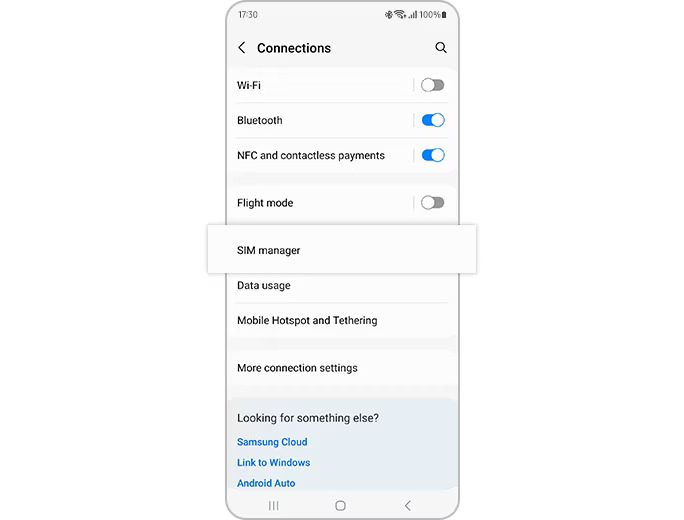
  • Go to Settings > Connections > SIM manager
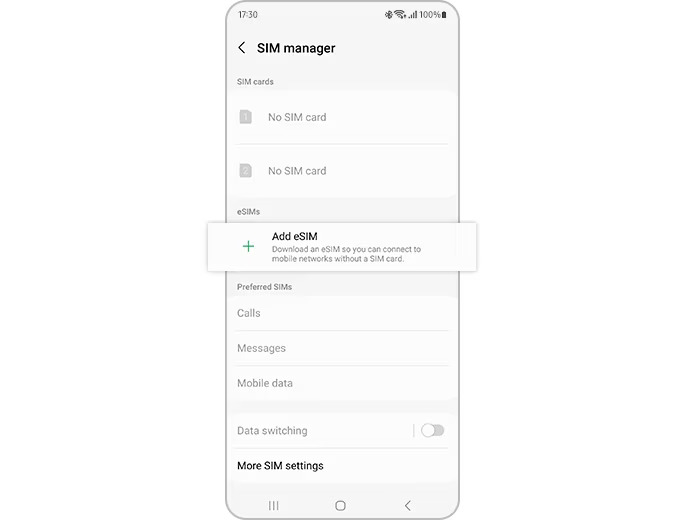
  • Tap Add eSIM then tap Scan QR code
  • Scan the QR code from eSIMlii
  • Your eSIM will be automatically downloaded and activated on your Samsung Galaxy device
Enter Activation Code manually
 
  • Go to Settings > Connections > SIM manager
  • Tap Add eSIM, tap Scan QR code > Tap Enter activation code
  • Enter the activation code provided by your network carrier
  • Your eSIM will be automatically downloaded and activated on your Samsung Galaxy device
Samsung Galaxy Smartphone
 
Step 1. Go to “Settings” > “Connections” > “SIM manager”.
   
Samsung Galaxy Smartphone  
   
Step 2. Tap “Add eSIM” and your mobile plan will be automatically downloaded and activated on your eSIM.  
   
eSIMlii Logo
eSIMlii Logo
Need help? You can reach eSIMlii support through any of these channels:
To talk to us right here on the website, click Send us a message. This opens our web chat, separate from the other support channels.
Send us a message
An error has occurred. This application may no longer respond until reloaded. Reload 🗙