Samsung GalaxyスマートフォンでeSIMをアクティブ化するにはどうすればよいですか?
Samsung GalaxyスマートフォンでeSIMをアクティブにすることは、eSIMLIIアクティベーションメールで提供されているQRコードを使用してこれらの手順に従う場合、迅速かつ簡単です。開始方法は次のとおりです。
行きます
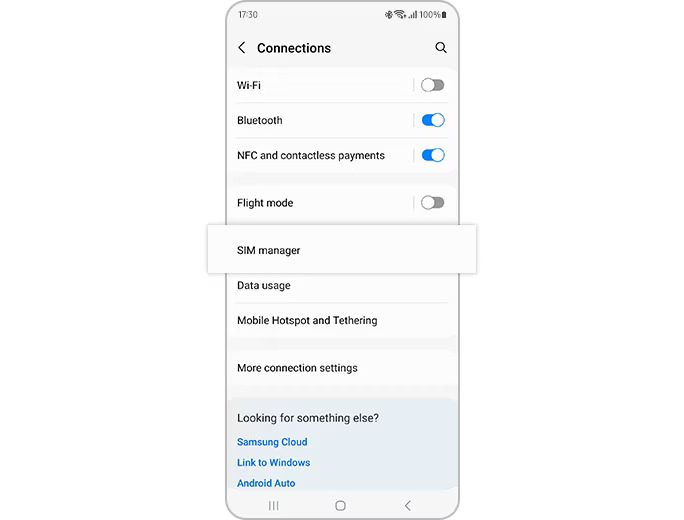
設定>接続> SIMマネージャー
タップします
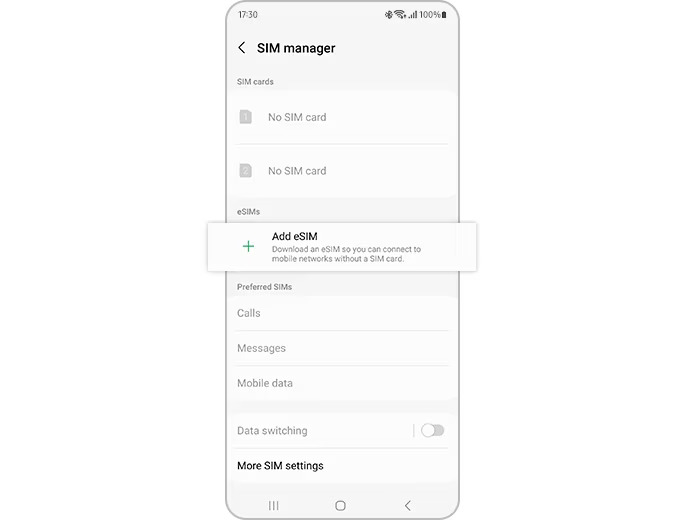
eSIMを追加します
次に、タップします
QRコードをスキャンします
eSimliiからQRコードをスキャンします
esimは自動的にダウンロードされ、Samsung Galaxyデバイスでアクティブ化されます
アクティベーションコードを手動で入力します
行きます
設定>接続> SIMマネージャー
eSIMの追加をタップし、スキャンQRコードをタップ> [アクティベーションコードの入力]をタップします
ネットワークキャリアが提供するアクティベーションコードを入力します
esimは自動的にダウンロードされ、Samsung Galaxyデバイスでアクティブ化されます
ステップ1。
「設定」>「接続」>「SIMマネージャー」に移動します。
ステップ2。
「eSIM を追加」をタップすると、モバイル プランが自動的にダウンロードされ、eSIM 上で有効になります。
Popular Destinations
Indonesia
United Arab Emirates
Italy
France
Thailand
Peru
Canada
United States
eSIMlii
About Us
Contact Us
Get FREE Promo Code
Become an Affiliate
Legal
Terms and Conditions
Privacy Policy
Cookies Policy
Refund Policy
Website Terms of Use
eSIM and More Info
What is an eSIM
Supported Devices
Help Center
FAQs
Blog
Check Usage
Follow Us
Reddit
Instagram
Twitter (X)
Facebook
TikTok
Applying Language Selected
Available
Need help? You can reach eSIMlii support through any of these channels:
WhatsApp
Facebook Messenger
Email
SMS
To talk to us right here on the website, click Send us a message. This opens our web chat, separate from the other support channels.
Send us a message
An error has occurred. This application may no longer respond until reloaded.
Reload
🗙