Comment activer mon smartphone eSIM sur Samsung Galaxy?
|
|
| L'activation de votre eSIM sur votre smartphone Samsung Galaxy est rapide et facile lorsque vous suivez ces étapes en utilisant le code QR fourni dans votre e-mail d'activation eSIMLII. Voici comment commencer: |
|
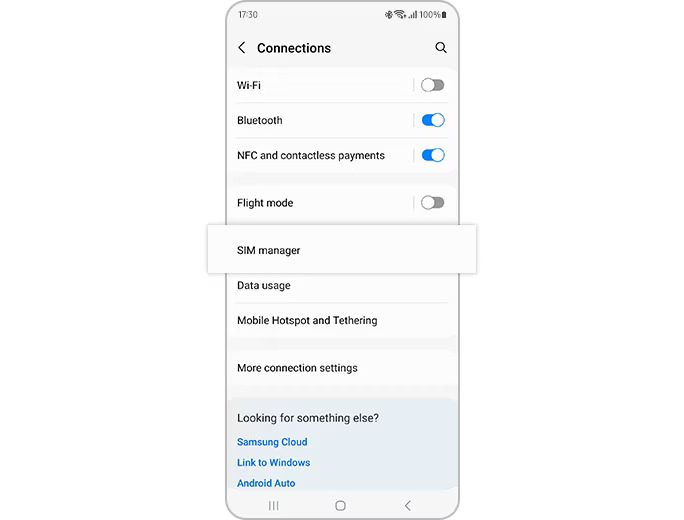
- Aller àParamètres> Connexions> Manager SIM
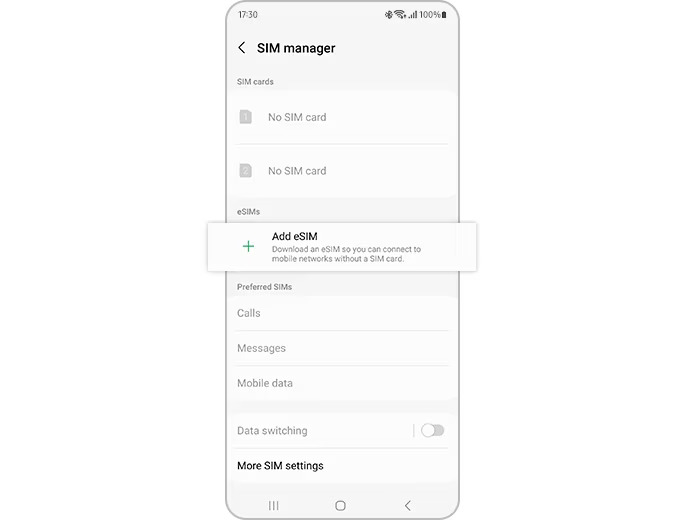
- RobinetAjouter eSIMpuis taperScanner le code QR
- Scannez le code QR à partir d'esimlii
- Votre eSIM sera automatiquement téléchargé et activé sur votre appareil Samsung Galaxy
|
|
| Entrez manuellement le code d'activation |
|
- Aller àParamètres> Connexions> Manager SIM
- Appuyez sur Ajouter eSIM, Appuyez sur Code QR Scan> Appuyez sur Entrée Code d'activation
- Entrez le code d'activation fourni par votre opérateur réseau
- Votre eSIM sera automatiquement téléchargé et activé sur votre appareil Samsung Galaxy
|
|
|
|
|
| Étape 1.Accédez à "Paramètres"> "Connexions"> "SIM Manager". |
|
|
|
 |
|
|
|
| Étape 2.Appuyez sur « Ajouter eSIM » et votre forfait mobile sera automatiquement téléchargé et activé sur votre eSIM. |
|
|
|
|